Workspaces in Alliesia
Duplicate a Workspace in Alliesia
Save time by duplicating an existing workspace. This is perfect for recurring projects, templates, or client-specific setups.
Click the three-dot menu next to the workspace in the Sidebar and select 'Duplicate Workspace'. Alliesia will instantly create a copy with the same projects, boards, and settings.
Step 1: Open the Duplicate Option
Locate the workspace you want to copy, click the three-dot menu, and select 'Duplicate Workspace'.
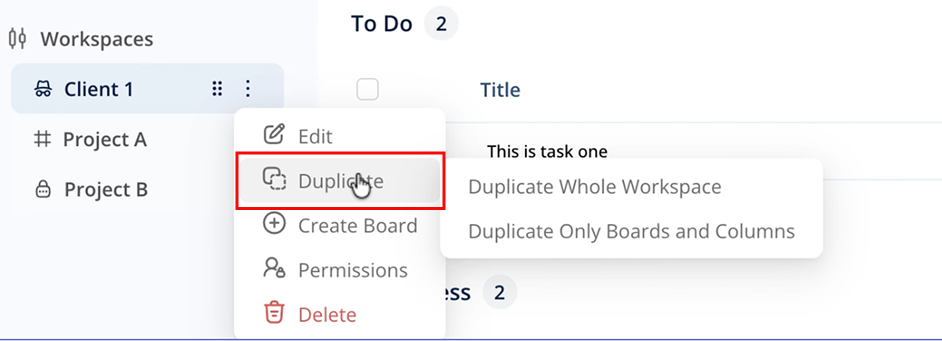
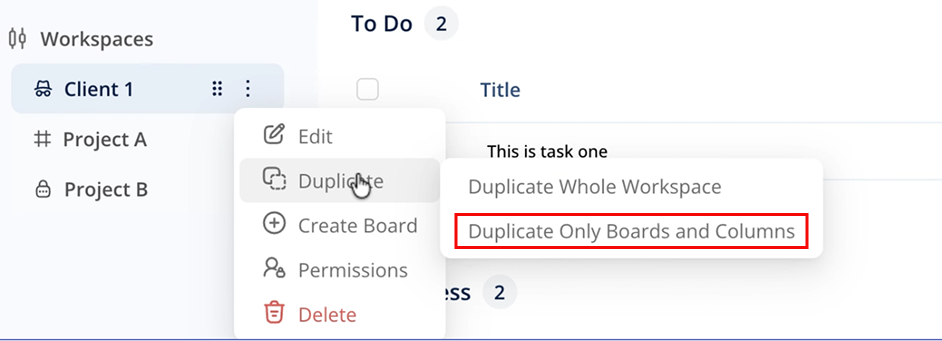
Step 2: Customize the Duplicate: Only Boards & Columns
This option just duplicates it's boards and column names without duplicating the data inside it. After duplicating, you can rename the new workspace and modify its type or other details as needed. This ensures the copy is tailored to the new project or team.
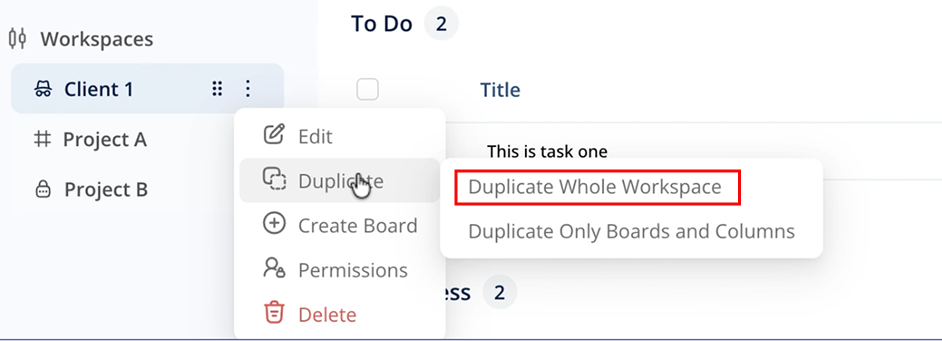
Step 3: Whole Workspace
This option fully duplicates it's boards and column names including duplicating the data inside it.
Step 4: Start Using the Duplicated Workspace
The duplicated workspace will appear in your Sidebar immediately. You can now invite members, create new projects, and continue collaboration without starting from scratch.
Pro Tip
Duplicating workspaces is a great way to save setup time, especially for recurring client projects or standard team workflows.